Starting EZStreet
By now you will have setup your EZStreet server
computer.
This section shows you how to start up EZStreet and
explains the key concepts behind the program. You will be introduced to the
Timesheet, Expense Report, Project, Client, and Invoice.
How to Begin
Because EZStreet is a Web-based application, you need
a Web browser to access the program. EZStreet has been developed to work with
Microsoft Internet Explorer version 5.0 or greater.
To access EZStreet, open a copy of Internet Explorer on your
computer, and then follow these steps:
- In the Address bar, enter the Web address of the
server where you installed EZStreet.
The Web address is also the URL. Some examples of URLs
are:
- http://localhost/EZStreet/ - Use this if EZStreet
was installed on the same computer you are running the Web browser on.
- http:///EZStreet/ -
Use this when EZStreet has been installed on your LAN. Replace with the name of the server.
- Press enter and the browser will take you to the
login page for EZStreet:
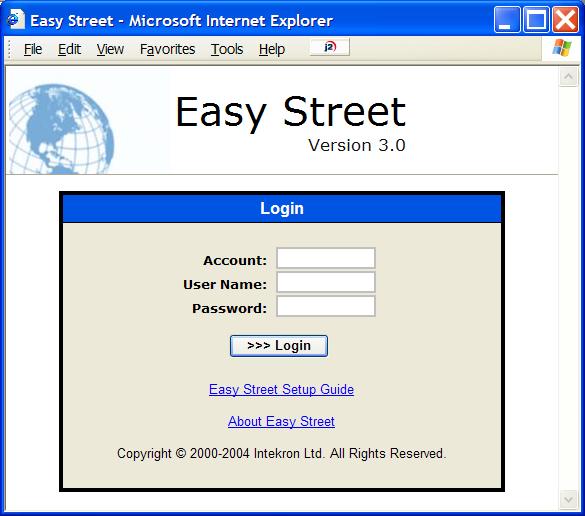
The default user is:
UserName: Admin
Password: password
Use this to login to EZStreet.
- To login to EZStreet, there is a default
Administrator User Name and Password. Enter admin in the User Name field, and password in the Password field. Click the Login
button.
- Once you login, you are presented with the Easy
Street Time Sheet view.
Main Menu
The Main Menu is the first group of selections across the top of the
screen.

The Main Menu is your gateway into EZStreet. There are five main sections
within EZStreet:
- Time Reporting – This section lets you enter and manage
your weekly time sheets. From here you can review your week, start, stop, and
restart tasks, and create, change, and delete time slips.
- Expense Reporting – This section lets you enter and
manage your expense reports. Create, modify, and delete expense
reports.
- Projects – This section lets you manage the projects that
time and expenses are tracked against.
- Clients & Billing – This section lets you manage the
clients that projects are created for, and to manage the invoices generated
from billable projects.
- Settings/Reports – This section lets you setup Easy
Street, import and export QuickBooks Pro data, and run reports for
analysis.
Key Ideas
EZStreet consists of five application objects that work together as one
program. EZStreet is a time sheet, an expense reporter, a client and billing
manager, and a project manager, all rolled into one. All five application
objects share the same database, making EZStreet a powerful, integrated
software system.
The Time Sheet
The EZStreet Time Sheet lets you track your time throughout a given week
that you might ordinarily have tracked in a paper-based system or a personal
organizer.
- Start, stop, and restart time slips as you work.
- Track time against projects in real-time.
- Online management approval of time slips.
You can track your time wherever you have access to a web-browser, as you
work. Imagine having an up-to-date time sheet – simplified time tracking makes
it possible.
The Expense Report
The EZStreet Expense Report lets you organize your expenses into any
number of reports. Each Expense Report is a collection of related expenses.
- Track expenses against projects.
- Online management approval of expenses.
- Assign markups.
- Automatically determine taxes.
You can have all of your expenses, from mileage to laundry, and be sure that
each one ends up on a project, justifying the expense.
The Project
The EZStreet Project lets you define precisely what work your company is
performing. The Project is a detailed definition of the following:
- Project name, description, start date, end date, estimated cost, and
estimated revenue.
- The client and project manager.
- Assigned staff.
- Tasks specific to this project.
- Time Slips booked on the project.
- Expenses booked on the project.
- Invoices generated from the project.
You can define as much or as little detail for each project as you want. The
more detail provided, such as estimated duration, revenue, and costs, will
provide you with a real-time project tracking and reporting tool as time and
expenses are booked on the project. EZStreet will give you a powerful tool to
compare your actual costs and revenue to estimates, helping you to improve the
efficiencies and effectiveness of your team, and your company.
The Client
The EZStreet Client is at the top of all activities performed and tracked.
Clients own the projects, and the projects own the time slips and expenses. The
client information includes:
- Address
- Credit Limit
- Business Number
- Taxation
- Credit Terms
- Invoices
You can define clients either as external customers, or as internal
departments within your own company.
The Invoice
The EZStreet Invoice is the result of all time and expense tracking. The
Invoice provides the chargeable statement that you send to your clients.
- Flexible Invoice generation – run for any cutoff date, any project, or any
client.
- Trial Invoices let you review and modify invoices before they are issued
to the client.
You can create invoices any time you want – by project, client, or all
billable projects. And once an invoice is created, you can review and make
changes online to the source time slips and expenses before it is approved and
issued to the client.
User Interface Guidelines
EZStreet provides a consistent look and feel to all of its various
windows. This consistency makes it easy for you to become familiar with the
software, and to quickly learn new sections.
Navigation
The way in which you move around EZStreet is called navigation. You
navigate by clicking on either links or actions. The main menu, section tabs,
and the menu bar, as shown below represent all navigation.

Clicking in the navigation areas will cause the action to perform and the
display to be changed.
Forms
EZStreet uses forms to group related information for display or data
entry. Forms are made up of fields, and there different types of fields and
different states these fields can be in, shown below.

Tables
EZStreet displays long lists of information in Tables. Each table is made
up of columns and rows, as in the example below. You can access the row by
clicking once on the row.
